C++ Programming Language

What is C++ ?
It is the most popular programming language also used to create high profile application and software. It was developed by Bjarne Stroustrup. It is also named as the extension of C programming language that's why it is called as C with ++ i.e. C++. It is easier of those who already know the C language because the basic similarities between C and C++ is having same syntax. It's popularity is because of the OOPS concept which C language don't have. It is not purely object oriented because we can write the code with or without object in C++.
First C++ program:
#include<iostream>
using namespace std;

int main(){
     cout<<"I am Kali";
     return 0;
  }
you should know:-
#include: It tells the compiler to include all the content of a file in source code.
main(): It is the entry point of every C++ program.
return 0: It is used to return a value from the function.
cout: It is used to print the statement.
VARIABLE IN C++
It is the basic unit of storage of the program. It can be alphabet(uppercase, lowercase), numbers or underscore but number should not be written in starting position.
SYNTAX: type variable_name;
float variable: float variable_name;(eg. float simpleInterest;)
int variable: int variable_name;(eg. int time;)
char variable: char variable_name;(eg. char variable;)
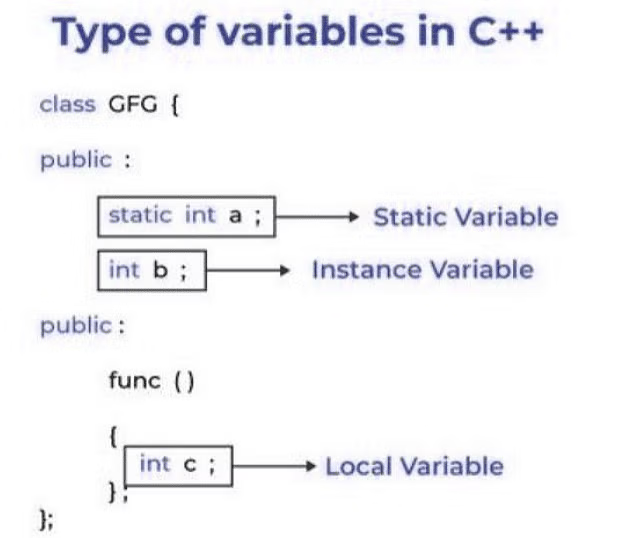
Types of variables:
local variable: It is defined with the constructor or block.
instance variable: It is defined as a non static variable which can be declared in the class but outside the block.
static variable: It can be same as instance variable but the only difference is we can declared using "static" keyword.
CONSTANT
Once whose value can't be modified after the declaration.
SYNTAX: const data_type variable_name=value;(eg. const int var=80;)
KEYWORDS
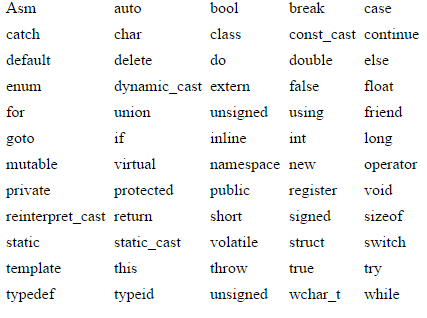
In C++ total keywords are 95 but in C, it is 32.
IDENTIFIER
It identifies the name of the particular entity. First character can be uppercase, lowercase or underscore.
DATA TYPES
- Primitive data type: It is a pre defined data types or built-in data type which can used directly by the user.
Integer
Character
Boolean
Floating Point
Double Floating Point
Valueless or Void
Wide Character
- Derived data type: It is primitive data type or built-in data type.
Function
Array
Pointer
Reference
- Abstract data type: It is a user defined data type.
Class
Structure
Union
Enumeration
Typedef defined Datatype
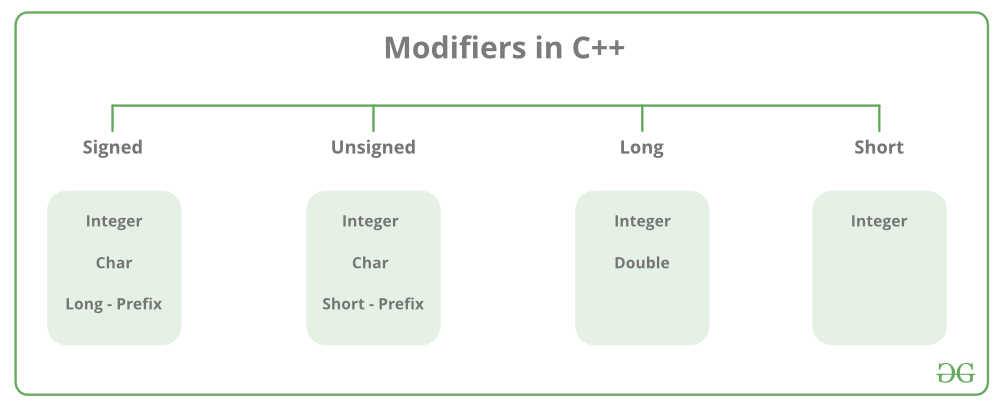
DATA MODIFIERS IN C++
OPERATORS IN C++
An operator operates the operands.
Types:-
Arithmetic operator: Perform mathematical calculation.
It can be divided into two types:-
Unary operator: works on single operands.(eg. ++,--)
Binary operator: work on two operands.(eg. +,-,*,%)
- Relational operator: Comparison between two operands.
Here 0 denotes false value and 1 denotes true value.
eg. is equal to(==), greater than(>), less than(<), greater than equal to(>=), less than equal to(<=), not equal to(!=)
- Logical operators: Combination of two or more conditions.
eg. AND(&&), OR(||), NOT(!)
- Bitwise operators: Perform bit level operations on the operands.
eg. binary AND(&), binary OR(|), binary XOR(^), left shift(<<), right shift(>>), one's compliment(~)
Assignment operator: eg. =,+=,-=,*=,/=
Ternary operator/Conditional operator(?:) : expression1 ? expression2 : expression3
CONDITIONAL STATEMENT IN C++
It is known for decision making purpose.

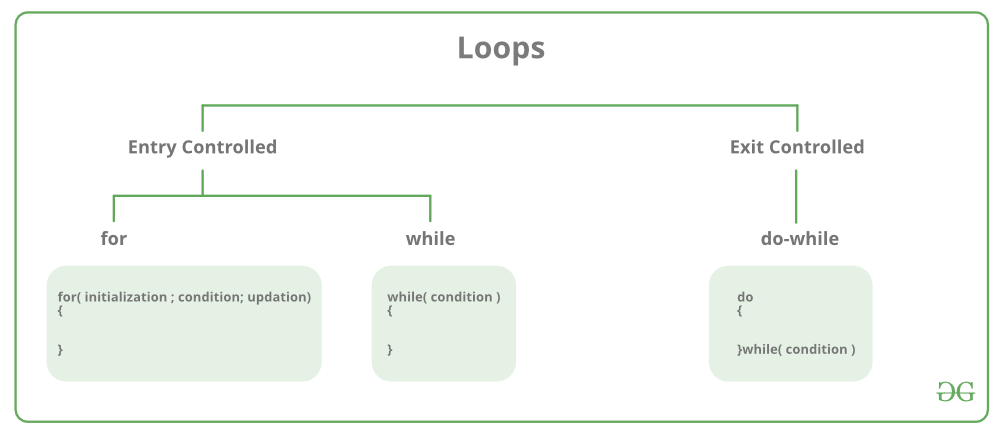
LOOPS IN C++
It is used for the repeating of code until the condition is matched.
BREAK AND CONTINUE
BREAK: It is used within the loops for the control flow statements. It is used for exiting the loop when the condition meet.
CONTINUE: It is used to encountered within the loops. It is used for skipping the iteration based on the condition.
SCOPE OF VARIABLES
Out of which variables are not known to the compilers.
PRECEDENCE
() > postfix > prefix > */% > +- > >> << > == > &| > && > =+=
FUNCTIONS
It is a self contained block of code that perform specific task.
SYNTAX: return_type function_name(parameter_type parameter_name);
PARAMETERS PASSING TO FUNCTION
FORMAL PARAMETER: Formal parameters are used to specify the data type and the name of the values that the function expects to receive.
void myFunction(int a, int b) {
    // 'a' and 'b' are formal parameters
    // Function body
}
ACTUAL PARAMETER: These are the values that are passed to the function when it's called.
int x = 10, y = 20;
myFunction(x, y); // 'x' and 'y' are actual parameters
CALL BY VALUE
In call by value, the function receives copies of the actual parameters passed to it.
void increment(int x) {
    x++; // Increment the local copy of 'x'
}

int main() {
    int num = 5;
    increment(num); // Call by value
    std::cout << "Original value: " << num << std::endl; // Output: 5
    return 0;
}
CALL BY REFERENCE
In call by reference, the function receives references (or aliases) to the actual parameters passed to it.
void increment(int &x) {
    x++; // Increment the original variable 'x'
}

int main() {
    int num = 5;
    increment(num); // Call by reference
    std::cout << "Modified value: " << num << std::endl; // Output: 6
    return 0;
}
INLINE FUNCTION
In C++, an inline function is a function that the compiler treats differently from a regular function during the compilation process.
The inline keyword is a hint to the compiler, suggesting that it should replace function calls with the actual body of the function wherever it's called, thus potentially reducing the overhead of function calls.
SYNTAX:
inline return_Type function_Name(parameters) {
// Function body
}
inline int add(int a, int b) {
    return a + b;
}
INLINE FUNCTION WITH CLASS
IMPLEMENTATION:
#include <iostream>
using namespace std;

class Calculator {
public:
    // Inline function to add two numbers
    inline int add(int a, int b) {
        return a + b;
    }

    // Inline function to subtract two numbers
    inline int subtract(int a, int b) {
        return a - b;
    }
};

int main() {
    Calculator calc;

    int result_add = calc.add(5, 3); // Inline function call to add
    int result_subtract = calc.subtract(5, 3); // Inline function call to subtract

    cout << "Result of addition: " << result_add << endl;
    cout << "Result of subtraction: " << result_subtract << endl;

    return 0;
}
POINTERS IN C++
A pointer is a variable that stores the memory address of another variable. They are particularly useful for dynamic memory allocation, passing addresses instead of values to functions.
SYNTAX: data_type *variable_name;
IMPLEMENTATION:
#include <iostream>
using namespace std;
int main() {
int num = 10; // Declare an integer variable
int* ptr = # // Declare a pointer variable and assign the address of 'num' to it
cout << "Value of num: " << num << endl; // Output: 10
cout << "Address of num: " << &num << endl; // Output: Memory address of 'num'
cout << "Value stored at the address pointed to by ptr: " << *ptr << endl; // Output: 10
cout << "Address stored in ptr: " << ptr << endl; // Output: Memory address stored in 'ptr'
return 0;
}
REFERENCES IN C++
A reference is an alias or alternative name for an existing variable.
SYNTAX:
type& reference_name = variable_name;
IMPLEMENTATION:
#include <iostream>

// Function to increment a number by reference
void increment(int& x) {
    x++; // Increment the original variable 'x'
}

int main() {
    int num = 5;
    std::cout << "Original value of num: " << num << std::endl; // Output: 5
    increment(num); // Pass 'num' by reference
    std::cout << "Modified value of num: " << num << std::endl; // Output: 6
    return 0;
}
ARRAY
It is a collection of elements of same data type, arranged in a contiguous memory location.
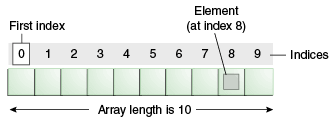
Array declaration
SYNTAX: data_type array_name[size_of_array];
eg. int arr[4];
ACCESSING ARRAY
IMPLEMENTATION:
#include <iostream>
using namespace std;

int main() {
    // Declare an array of integers with 5 elements
    int numbers[5] = {1, 2, 3, 4, 5};

    // Access and print each element of the array
    for (int i = 0; i < 5; ++i) {
        cout << "Element at index " << i << ": " << numbers[i] << endl;
    }

    return 0;
}
UPDATE ARRAY ELEMENT
SYNTAX: arr[i]=new_value;
IMPLEMENTATION:
#include <iostream>

using namespace std;

int main() {
    // Declare an array of integers with 5 elements
    int numbers[5] = {1, 2, 3, 4, 5};

    // Print the original array
    cout << "Original array:" << endl;
    for (int i = 0; i < 5; ++i) {
        cout << "Element at index " << i << ": " << numbers[i] << endl;
    }

    // Update an element of the array
    numbers[2] = 10; // Update the element at index 2 to 10

    // Print the updated array
    cout << "\nUpdated array:" << endl;
    for (int i = 0; i < 5; ++i) {
        cout << "Element at index " << i << ": " << numbers[i] << endl;
    }

    return 0;
}
SIZE OF ARRAY
SYNTAX: data_type size=size_of(array_name)/size_of(array_name[index]);
IMPLEMENTATION:
#include <iostream>
using namespace std;

int main() {
    // Declare an array of integers with 5 elements
    int numbers[5] = {1, 2, 3, 4, 5};

    // Calculate the size of the array
    int size = sizeof(numbers) / sizeof(numbers[0]);

    // Print the size of the array
    cout << "Size of the array: " << size << endl;

    return 0;
}
RELATION BETWEEN ARRAY AND POINTER
IMPLEMENTATION:
// C++ Program to Illustrate that Array Name is a Pointer
// that Points to First Element of the Array
#include <iostream>
using namespace std;

int main()
{
    // Defining an array
    int arr[] = { 1, 2, 3, 4, 5, 6 };

    // Define a pointer
    int* ptr = arr;

    // Printing address of the arrary using array name
    cout << "Memory address of arr: " << &arr << endl;

    // Printing address of the array using ptr
    cout << "Memory address of arr: " << ptr << endl;

    return 0;
}
TWO DIMENSIONAL ARRAY IN C++
Elements arranged in rows and columns.
SYNTAX: data_type array_name[p][q];
Here p=number of rows and q=number of columns
IMPLEMENTATION:
#include <iostream>
using namespace std;

int main()
{
    // Declaring 2D array
    int arr[4][4];

    // Initialize 2D array using loop
    for (int i = 0; i < 4; i++) {
        for (int j = 0; j < 4; j++) {
            arr[i][j] = i + j;
        }
    }

    // Printing the element of 2D array
    for (int i = 0; i < 4; i++) {
        for (int j = 0; j < 4; j++) {
            cout << arr[i][j] << " ";
        }
        cout << endl;
    }

    return 0;
}
THREE DIMENSIONAL ARRAY
SYNTAX: data_type array_name[D][R][C];
IMPLEMENTATION:
 #include <iostream>
using namespace std;

int main()
{
    // declaring 3d array
    int arr[3][3][3];
    // initializing the array
    for (int i = 0; i < 3; i++) {
        for (int j = 0; j < 3; j++) {
            for (int k = 0; k < 3; k++) {
                arr[i][j][k] = i + j + k;
            }
        }
    }

    // printing the array
    for (int i = 0; i < 3; i++) {
        cout << i << "st layer:" << endl;
        for (int j = 0; j < 3; j++) {
            for (int k = 0; k < 3; k++) {
                cout << arr[i][j][k] << " ";
            }
            cout << endl;
        }
        cout << endl;
    }
    return 0;
}
STRING IN C++
It is a sequence of character stored in a contiguous block of memory. We use string keyword for defining string.
IMPLEMENTATION:
#include <iostream>
using namespace std;

int main()
{

    string s = "kali";
    string str("kali");

    cout << "s = " << s << endl;
    cout << "str = " << str << endl;

    return 0;
}
PASSING STRING TO FUNCTION
IMPLEMENTATION:
#include <iostream>
using namespace std;

void print_string(string s)
{
    cout << "Passed String is: " << s << endl;
    return;
}

int main()
{
    string s = "geekgazette";
    print_string(s);

    return 0;
}
POINTER AND STRING
IMPLEMENTATION:
#include <iostream>
#include <string>

using namespace std;

int main() {
    // Declare a string
    string str = "Hello, World!";

    // Declare a pointer to a string
    string* ptr = &str;

    // Output the string using the pointer
    cout << "String using pointer: " << *ptr << endl;

    // Modify the string using the pointer
    *ptr = "Goodbye, World!";

    // Output the modified string
    cout << "Modified string using pointer: " << *ptr << endl;

    return 0;
}
DIFFERENCE BETWEEN STRING AND CHARACTER ARRAY
Syntax:
Character arrays are declared as arrays of characters. They are represented using C-style strings, which are sequences of characters terminated by a null character
'\0'.Strings are declared using the
std::stringclass from the C++ Standard Library.
Example of character array:
char charArray[] = "Hello, World!";
Example of string:
std::string str = "Hello, World!";
Termination:
Character arrays require a null character
'\0'at the end to indicate the end of the string.Strings are automatically null-terminated, so you don't need to explicitly include the null character.
Size:
Character arrays have a fixed size that needs to be specified when declaring the array.
Strings can dynamically resize themselves to accommodate the size of the string.
Functionality:
Character arrays lack built-in functionality for string manipulation. You typically need to use functions from the C standard library, such as
strlen,strcpy,strcat, etc., for string operations.Strings have built-in functionality for various string operations, such as concatenation (
+operator orappendfunction), substring extraction (substrfunction), finding substrings (findfunction), etc. These functions are part of thestd::stringclass.
SOME INBUILT FUNCTION IN C++

STRUCTURE IN C++
We can declare the structure keyword using "struct".
SYNTAX:
struct{
//declaration of struct
}
IMPLEMENTATION:
#include <iostream>
#include <string>

using namespace std;

// Define a structure representing a person
struct Person {
    string name;
    int age;
    double height;
};

int main() {
    // Declare variables of type Person
    Person person1, person2;

    // Initialize person1
    person1.name = "John";
    person1.age = 30;
    person1.height = 6.1;

    // Initialize person2
    person2.name = "Alice";
    person2.age = 25;
    person2.height = 5.6;

    // Output information about person1
    cout << "Person 1:" << endl;
    cout << "Name: " << person1.name << endl;
    cout << "Age: " << person1.age << endl;
    cout << "Height: " << person1.height << " feet" << endl;

    // Output information about person2
    cout << "\nPerson 2:" << endl;
    cout << "Name: " << person2.name << endl;
    cout << "Age: " << person2.age << endl;
    cout << "Height: " << person2.height << " feet" << endl;

    return 0;
}
Structure using typedef
It is a keyword that is used to assign a new name to any existing data-type.
IMPLEMENTATION:
#include <iostream>
#include <string>

using namespace std;

// Define a structure representing a person
typedef struct {
    string name;
    int age;
    double height;
} Person;

int main() {
    // Declare variables of type Person
    Person person1, person2;

    // Initialize person1
    person1.name = "John";
    person1.age = 30;
    person1.height = 6.1;

    // Initialize person2
    person2.name = "Alice";
    person2.age = 25;
    person2.height = 5.6;

    // Output information about person1
    cout << "Person 1:" << endl;
    cout << "Name: " << person1.name << endl;
    cout << "Age: " << person1.age << endl;
    cout << "Height: " << person1.height << " feet" << endl;

    // Output information about person2
    cout << "\nPerson 2:" << endl;
    cout << "Name: " << person2.name << endl;
    cout << "Age: " << person2.age << endl;
    cout << "Height: " << person2.height << " feet" << endl;

    return 0;
}
UNION IN C++
It is declared using the union keyword.
IMPLEMENTATION:
#include <iostream>

using namespace std;

// Define a union representing a value that can be either an integer, float, or character
union MyUnion {
    int intValue;
    float floatValue;
    char charValue;
};

int main() {
    // Declare a variable of type MyUnion
    MyUnion myUnion;

    // Set the integer value
    myUnion.intValue = 10;

    // Access and output the integer value
    cout << "Integer value: " << myUnion.intValue << endl;

    // Set the float value
    myUnion.floatValue = 3.14;

    // Access and output the float value
    cout << "Float value: " << myUnion.floatValue << endl;

    // Set the character value
    myUnion.charValue = 'A';

    // Access and output the character value
    cout << "Character value: " << myUnion.charValue << endl;

    return 0;
}
Short summary on NEW and DELETE operator
new Operator:
The
newoperator is used to dynamically allocate memory for objects or arrays on the heap.It returns a pointer to the newly allocated memory.
Syntax for allocating memory for a single object:
pointer_variable = new data_type;Syntax for allocating memory for an array:
pointer_variable = new data_type[size];Example:
  int* ptr = new int; // Allocates memory for a single integer
  int* arr = new int[10]; // Allocates memory for an array of 10 integers
delete Operator:
The
deleteoperator is used to deallocate memory that was previously allocated using thenewoperator.It releases the memory back to the system.
Syntax for deallocating memory for a single object:
delete pointer_variable;Syntax for deallocating memory for an array:
delete[] pointer_variable;Example:
  delete ptr; // Deallocates memory for a single integer
  delete[] arr; // Deallocates memory for an array of integers